Roaming User command file (mycmds.dat) modification:
As far as I can tell, the key to modification and synchronization of a Roaming User command file is dependent on making sure that the Roaming User is only opened on one machine at a time. If this concept is followed, the mycmds.dat file is copied from the Master Roaming Directory (mapped network drive) to the Local (machine) Directory on opening, and (if modified) copied back to the Master Roaming Directory on closing of the user (opening a different user or closing NaturallySpeaking itself-including SayWhatPro). This is all done transparently by NaturallySpeaking as part of the Roaming User functionality.
If the command file is modified on multiple machines at the same time, one or the other machines changes will be lost, because the entire mycmds.dat file seems to be copied as part of the process. The first machine to close the same user will have its mycmds.dat file copied, but then the later machine closing user synchronization will overwrite the mycmds.dat file with its copy.
Since NaturallySpeaking will allow multiple user opening, there is no easy way to alert you to overlapping updating, making the value of doing roaming user command updating reliable only if you can follow the "only one machine opens a user at a time" concept, or only make your modifications on one machine.
Please let me know if you have a different understanding or observation of the actual processes involved.
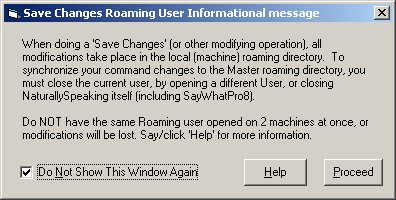
The following is a screenshot of a informational screen displayed on the first "Save Changes" of a Roaming User (the Help is this page):
An additional situation can arise if roaming users only are allowed: if the network is not available, SayWhatPro cannot start up unless NaturallySpeaking has been started also without the network available. NaturallySpeaking will complain that the network directory is not available, but you can open from the local cache directory. This is okay. However, additionally, to resynchronize any command file changes to the master network location, you must close SayWhatPro and NaturallySpeaking, then reconnect to the network, then reopen NaturallySpeaking. This last step will do the synchronization (close again after the synchronization to avoid the open on more than one machine at a time as above).